
Report Keyboard
The buttons beneath the report open more data or act on the report message.

| Button | What it does |
|---|---|
| 📊 View Detailed Report | Opens the section menu below. |
| 👀 Track Dev | Opens Watcher for the report’s deployer address. From a group, opens Trenchy in private chat. |
| 🔄 Refresh | Requests an updated report view. |
| 🗑 Close | Removes the report message. It does not sell tokens or stop watching a deployer. |
Inside View Detailed Report
Section titled “Inside View Detailed Report”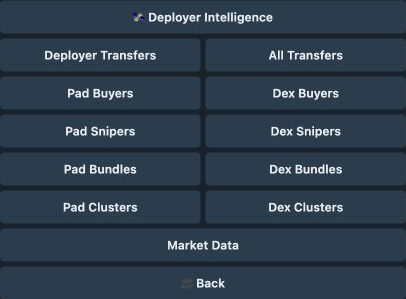
| Option | Opens |
|---|---|
| Deployer Intelligence | Creator launch history, median ATH, and performance. |
| Deployer Transfers / All Transfers | Creator transfer trace or traces for investigated wallets. |
| Pad Buyers / Dex Buyers | First-buyer lists for the launchpad or pool event. |
| Pad Snipers / Dex Snipers | Sniper groups and wallet activity. |
| Pad Bundles / Dex Bundles | Bundle groups and wallet activity. |
| Pad Clusters / Dex Clusters | Coordinated buying groups and wallet activity. |
| 🔒 Locks | Token locks and liquidity-lock evidence saved with the report. |
| Market Data | Additional market and trading-period data. |
| 🔙 Back | Returns to the report. |
A token-lock advisory can also open Locks through its View Details link. See what the saved report can show under Locks and liquidity.
Arrows move through longer lists. Reports with limited history can omit Track Dev and history-dependent detail options.